
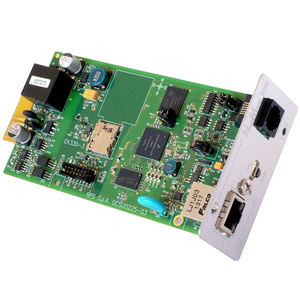
NetMan 204
📍Manufactured in GURGAON, Haryana, India
<p> </p> <h3> </h3> <p>Network card</p> <div class="formatted-description" style="box-sizing: border-box; font-family: ubuntulight;"> <p>The NetMan 204 network agent allows UPS directly connected over LAN 10/100 Mb connections to be managed using the main network communication protocols (TCP /IP , HTTP HTTPS, SSH, SNMPv1, SNMPv2 and SNMPv3). It is the ideal solution for the integration of UPS over Ethernet networks with Modbus/TCP and BACnet/IP protocols. It was developed to integrate UPS into medium-sized and large networks, to provide a high level of reliability in communication between the UPS and associated management systems.</p> <p>New features include the LDAP and Active Directory user authentication and the full integration with VMware’s Esxi and vCenter server for VM and host graceful shutdown.</p> <p> </p> <ul> <li>32bit RISC processor</li> <li>Compatible with 10/100 Mbps Ethernet and IP v4/6 networks</li> <li>Compatible with PowerShield³ and TeleNetGuard</li> <li>Web User Interface for Configuration, Management, and Administration.</li> <li>Seamlessly integrates with VMware’s Esxi and vCenter server</li> <li>LDAP and Active Directory user authentication</li> <li>SNMP v1, v2 and v3 with Standard IETF UPS MIB (RFC 1628) and Riello UPS Mib for PowerNetGuard and NMS connections</li> <li>SNMP v1 with RFC3433 for the management of environmental sensors</li> <li>HTTP and HTTPS for UPS control via web browser</li> <li>SMTP for alarm notifications and UPS status updates via email</li> <li>Modbus/TCP</li> <li>BACnet/IP</li> <li>Maximum expandability</li> <li>WiFi ready, using a customized dongle can communicate via WiFi network</li> <li>Events log and data management</li> <li>Wake-on-LAN management for starting computers via TCP /IP network</li> <li>Other standards: DHCP, DNS, FTP, NTP , ICMP , IGMP</li> <li>Management of environmental sensors</li> <li>Configurable via SSH sessions and HTTP</li> <li>Firmware upgradeable via FTP and HTTP.</li> </ul> <p> </p> <p> </p> </div>